These are my notes on Jev, TypeSafe AI’s decision model: the questions it answers, the practical lessons and basic hygiene I wrote down while using it, the Box question that came with Jev 1.14, and the demo I built with it.
Jev and its questions
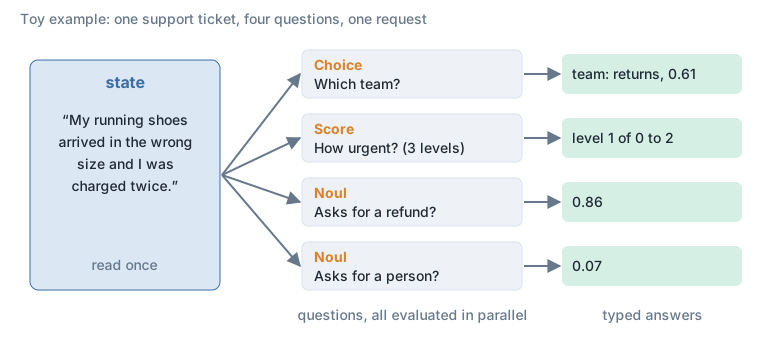
Jev does not write text. You send it a state (a text, a JSON object, and since 1.14 images too) and a set of typed questions, and it returns typed answers with probabilities. TypeSafe calls it a System One model.
- questions:
Score()Noul()Choice()Box()
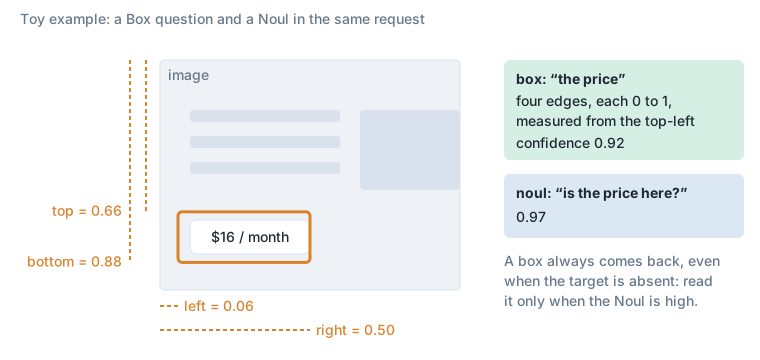
A Choice picks one option from a list and returns a probability per option. A Score places the state on an ordered rubric. A Noul returns the probability that a statement is true. A Box, new in Jev 1.14, finds where something is in an image: it returns the four edges of one box around it, as fractions of the image’s width and height, and a confidence.
with TypeSafeClient(model="...") as client:
    r = client.system_one(
        state=ticket,
        questions={
            "answer1": Choice(instructions=..., criteria={...}),
            "answer2": Score(instructions=..., criteria=[...]),
            "is_yes_answer3": Noul(instructions=...),
        },
    )
a = r.answers- each question is processed in parallel from a cache of the state that Jev processed
Practical notes
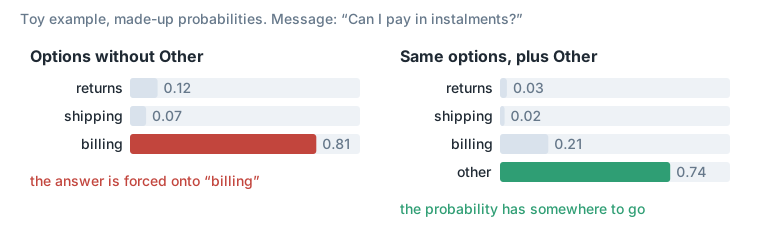
- if your options don’t contain the answer, Jev will hallucinate; a threshold might catch it (only accept the answer if probability > 0.9, but still not always), therefore always include an “Other” option
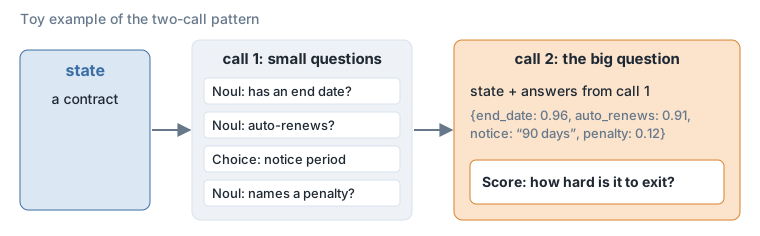
- Jev isn’t good for reasoning tasks: split them instead into multiple small questions that might lead the way to answering the big one (pass them to Jev in a first call, and then pass its answers to Jev in a second call)
- ask many questions in parallel, it’s almost as cheap as asking one, because Jev reads the state once and then answers things
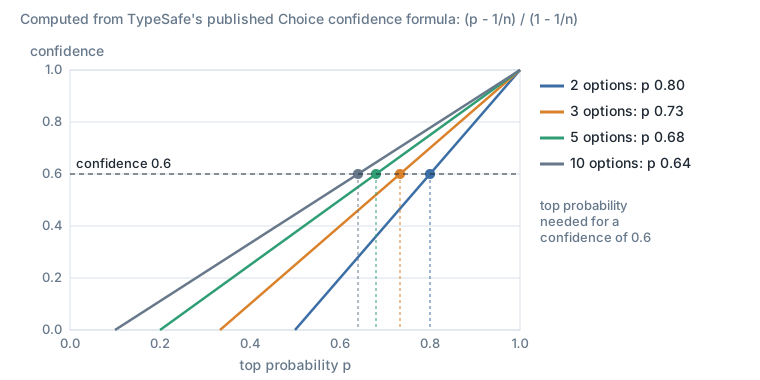
- adding more options to the question reduced the number Jev spits out (confidence), because confidence is a function of the probability AND of the number of choices: you should simply take the answer with the highest probability and not care about the threshold (if you have an “unknown” option). If you don’t have an “unknown” option, use the formula to compute the threshold for accepting an answer (> 0.8 for 2 options is equivalent to > 0.6 for 3 options, for example; not precise numbers)
TypeSafe’s docs give the formula: for a Choice with n options and top probability p, confidence = (p - 1/n) / (1 - 1/n). A confidence of 0.6 needs a top probability of 0.8 with 2 options, 0.73 with 3, 0.68 with 5 and 0.64 with 10.
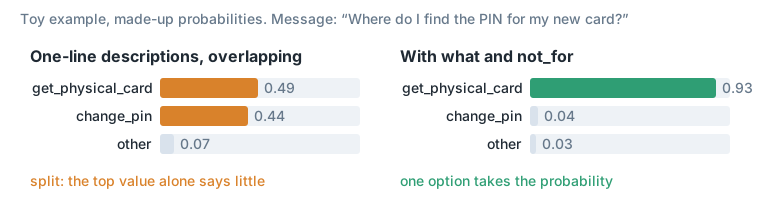
- options shouldn’t overlap: when they do, Jev splits the probability between them, and therefore you can no longer only take the top scoring value
- use the description and the not_for fields attached to each option to make it clear what options are and to avoid overlap, for example:
"get_physical_card": {
    "what": "Finding or getting the PIN for a card",
    "not_for": "Changing an existing PIN (change_pin)"
},
"change_pin": {
    "what": "How or where to change an existing PIN",
    "not_for": "Finding the PIN of a card (get_physical_card)"
}
The field names are your own choice: TypeSafe’s docs say what, not_for and examples are not part of the API, and the model reads the names along with the values.
- if you want to define a threshold to pass on, use a
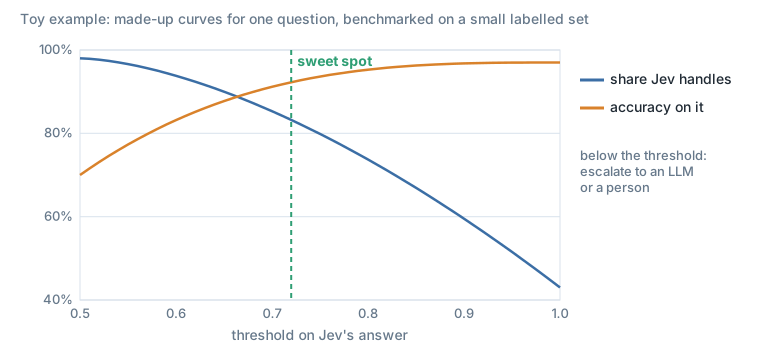
Noul(how_urgent), for example, instead of using the threshold on aChoice([urgent, busy, ...]) - define the threshold of routing to Jev vs escalating to an LLM or a person:
- a threshold should be adapted to the question; benchmark it on a small set first to see where the sweet spot is: maximize the use of Jev without reducing the accuracy significantly
Architecture
- Jev is a causal decoder
- if you place the reference last, it gives correct results more often
- a natural objective is log loss for RLCD
RLCD is TypeSafe’s name for its training method, reinforcement learning for calibrated decisions.
Notes after Jev Jam
Jev Jam was indeed very Joyous. A couple of notes:
- you should definitely use Jev to do CI for non-deterministic code
- try the new Box capability. My demo ended up being something we’ll use for pipelinevideo.com; I’ll share more soon
Basic hygiene:
- do as many parallel questions as you need, but make sure the state of the model includes all that’s needed for every question (context-wise)
- always have an “unknown/other” option
- options shouldn’t overlap if you’re planning on using the probability returned (use the not_for and description fields to avoid that)
- if you plan on using a threshold (say, to condition the downstream process), use a Noul
Jev 1.14 and the Box question
TypeSafe released Jev 1.14 on 14 October 2026, in a post called “Jev: For the builders AND dreamers”. It added three experimental features, not recommended for production yet: images in the state, instructions or criteria; a new Box question type; and a long-context mode. Images and long context are each switched on by a “danger zone” request header, and TypeSafe’s Box docs ask for the images header, TypeSafe-Danger-Zone-Images: true, on every request that has an image or a Box question.
A Box question takes an image and a description of what to find, and returns one bounding box: its four edges as fractions of the image’s width and height, and a confidence. A Box answer is always a box, even when the thing is not in the image, so TypeSafe’s docs suggest asking a Noul in the same request (“is it there?”) and ignoring the box when the Noul is low. My demo uses that pairing.
What I built with Box: Jev Highlight
Talk about a website, and the page scrolls to the part you mean and lights it up. If it is on another page or tab of the site, the app clicks through to it first.
Type a website address, press Start and talk. Without a microphone, use the “Type what you would say” box: it sends the phrase through exactly the same path.
It matches meaning, not words: say “what does it cost” and the price lights up; say “how do I get started” and the sign-up button does. “Does it record sessions for compliance” opens tailscale.com’s Privileged Access tab and lights up “Record full sessions for auditability and compliance”. I put it up at jev.pipelinevideo.com, behind a password for now.
How it works
- Load: a headless Chrome takes a full-page screenshot of the site, cuts it into tiles (Jev accepts images of 280 to 1568 px a side), then captures the site’s header pages and in-page tab states in the background.
- Talk: the browser’s own speech recognition sends the last few words of the current sentence every 0.7 s.
- Find: per tile, one Jev request asks a yes/no (“does this tile show what is being talked about?”) and a Box. The yes/no picks the tile; the Box says where. A second Box on a zoomed crop tightens it. If nothing on the current page matches, a text-only Jev question ranks the other pages and tabs, and the best two are searched.
- Show: the page scrolls, and the highlight lands, in under a second after you speak.
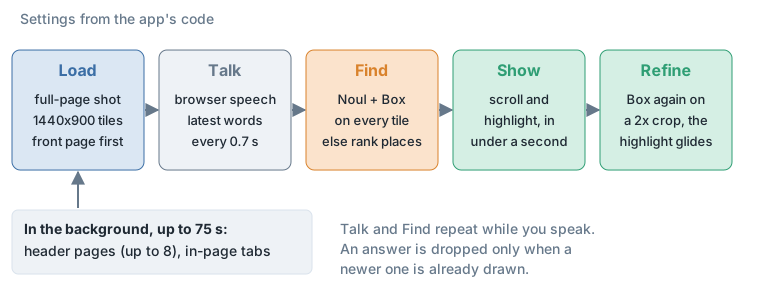
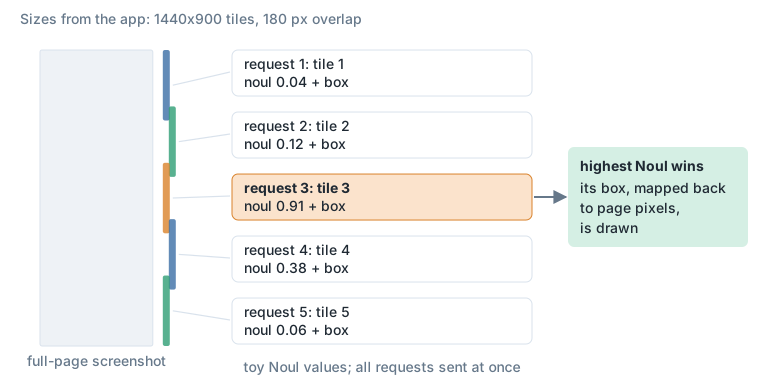
Load. The front page is opened at 1440x900, cookie banners are removed, the page is scrolled through so lazy images load, and a full-page screenshot is taken, cut at 14000 px and into 1440x900 tiles overlapping by 180 px. The front page shows at once.
The rest of the site, in the background. Up to 8 navigation pages: visible same-site links in the header (not the logo, login, sign-up, legal, careers). The link’s label and its box on the page are kept. Three pages are captured at a time. In-page tabs on every captured page: ARIA tablists, and rows of 3 to 8 sibling buttons outside the header. Each tab is clicked; the rows of the page that change, compared with a second shot taken without a click to ignore marquees and carousels, become that tab’s own place. A row whose clicks change nothing is not a tab row. All of it stops at 75 s. The row of tabs above the page shows each page, marked while it captures; the status line says what was captured and what was not, and why.
Find, per phrase:
- The current place: one request per tile, all at once, each a
boxand anoul. The tile with the highestnoulwins. - At the same moment, a text-only
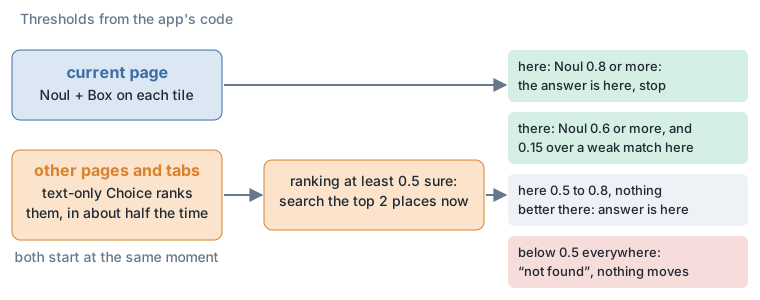
choiceover the other places (their headings, or a tab’s panel text) ranks where it might be, in about half the time an image search takes. When that ranking is at least 0.5 sure, the top 2 places’ tiles are searched at once, alongside the current page. - At 0.8 or more on the current place, that is the answer. Below it, the other places can win: at 0.6 or more, and by 0.15 over a weak match here. Below 0.5 everywhere: “not found”, and nothing moves.
The click, shown. The link or tab lights up on the current screenshot, a pulse marks the click, the other screenshot replaces it, and the answer lights up there. Two clicks (another page, then a tab on it) take roughly twice as long on screen as one.
Refine. A second look at a crop around the box, enlarged 2x; the highlight glides to the tighter box. It costs one more round trip, so the browser draws the first box at once and lets the refined one glide in after.
Speech. Web Speech API, en-US, continuous with interim results. The latest words go out every 0.7 s, inside the sentence being spoken. An answer is dropped only when a newer one has already been drawn. On “not found” the last highlight stays and fades by itself.
Why this shape, measured rather than assumed
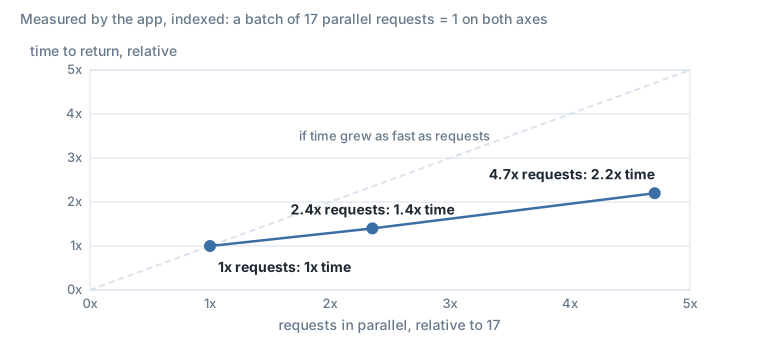
- Jev counts every image a question references against one token budget per request, about four 1440x900 tiles, so each tile is its own request. Sending 40 in parallel instead of 17 takes only about 1.4 times as long, and 80 about 2.2 times as long; no 429 at 80.
- Searching beyond the page (tailscale.com, 13 places): the text ranking named the right place first in every jump case, often with a probability close to 1. Searching all 13 places’ tiles at once took about 1.4 to 2.1 times as long as ranking plus 2 places, and sent 4 to 5 times as many requests. So: ranking.
- The
noulpicks the right tile far better than the box’s own confidence. The box confidence is high on any tile with a generic “Get started” button, whatever was asked, so it only breaks ties. - The first box is often a little off; the zoomed second pass fixed every such case I checked.
Images are billed as input tokens at the text price (TypeSafe lists $0.042 per million input tokens, output free), so a phrase costs one tile’s worth of tokens for every tile searched.
The app reaches Jev 1.14 through OpenRouter’s Decisions API, which serves the same model. The one difference is how an image travels: OpenRouter takes it as an image_url part inside state, not as a multipart assets entry. Sent the TypeSafe way, the image is silently dropped and Box answers blind (about a twelfth of the input tokens it should be, and a much lower confidence).
Known limits
- Capture takes time: the rest of the site takes two to four times as long as the front page. A phrase about a page still capturing finds nothing until it lands.
- Current page first. “I want to talk to your sales team” on tailscale.com lights up the front page’s “Contact sales” button rather than opening the Contact sales page. That is the rule, and usually what a viewer expects.
- A short fragment can jump. Live speech sent “so how much” on linear.app and it went to Pricing with a middling Noul. It was right that time; it will not always be.
- The nav link is drawn where it was on the front page. That is right when every page has the same header, which is the common case.
- Tab states are the page as loaded, with the changed rows taken from the clicked state. A tab that changes the page height can leave a visible seam below its panel.
- It is still screenshots: no hover states, no dropdown menus (their links are not captured), nothing behind a login.
- Latency is about one and a half to two times as long when the answer is on another place as when it is on the current one, plus the click animation and whatever the recogniser takes. One slow tile holds up the whole answer.
- Load: with speech every 0.7 s, each phrase sends the current page’s tiles plus, when the ranking is confident, two other places’ tiles: one to three pages’ worth of image requests a phrase.
- Geo and locale: some sites answer by the server’s location, so a page can come back in another language.
- Speech is tested for Chrome. Edge and Safari have the API too; Firefox does not and gets the text box only.
Images and Box are preview features at TypeSafe, and answers vary a little between runs. This is a demo, not a product.
The same idea in a Pipeline Video film
Alongside the app I made a companion to a short Tailscale film made with Pipeline Video. It shows Tailscale’s front page. For each narrated phrase, Jev (jev-1.14.0) is asked where on the page that phrase is. The page scrolls there and the box Jev returned is highlighted.
The companion film. For each narrated line, the page scrolls to where Jev’s Box found it, draws that box and shows its confidence.
- The phrases are the voiceover lines, with the times taken from the speech-to-text word timings.
- The page’s content column is cut into 8 tiles of 1360x1000, with 30% overlap. No tile is downscaled.
- The relevance call sends one request per phrase, with all 8 tiles and one
noulper tile. The tile with the highest noul wins. If that noul is under 0.5, the phrase gets no highlight. - The box call sends one
boxquestion on the winning tile alone. If the box confidence is under 0.4, the phrase gets no highlight.
Box questions asked in the same request as all 8 tiles came back loose; one box came back as a tall strip. Asking about one tile on its own gave tight boxes. The film draws only boxes Jev returned; nothing is placed by hand.
The second version has a new, shorter voiceover, written to match the front page. Every line points at something real on the page, in other words than the page uses. That paraphrase is what the demo shows. Before voicing, each draft line was tried against Jev. A line that missed was rewritten until it landed.
Sources
- TypeSafe AI, “Introducing System One Models & Jev”, 15 September 2026: https://typesafe.ai/blog/introducing-system-one-models-and-jev
- TypeSafe AI, “Jev: For the builders AND dreamers” (Jev 1.14), 14 October 2026: https://typesafe.ai/blog/jev-1-14
- TypeSafe docs, Box: https://docs.typesafe.ai/go/box
- TypeSafe docs, Primitives (Questions): https://docs.typesafe.ai/primitives
- TypeSafe docs, Python SDK questions (Choice, Score, Noul, Box): https://docs.typesafe.ai/sdk/python/api/types/questions
- TypeSafe docs, Images: https://docs.typesafe.ai/go/images
- TypeSafe docs, Choice: https://docs.typesafe.ai/primitives/choice
- TypeSafe docs, Score: https://docs.typesafe.ai/primitives/score
- TypeSafe docs, Noul: https://docs.typesafe.ai/primitives/noul
- TypeSafe docs, Confidence: https://docs.typesafe.ai/confidence
- TypeSafe docs, Models: https://docs.typesafe.ai/models
- OpenRouter, Jev 1.14: https://openrouter.ai/typesafe/jev-1.14